When is the application synced with your intended changes?
Argo CD’s sync status tells you whether the manifests in the repository have been applied to the cluster. It doesn’t tell you however, whether the changes Octopus made have been overwritten in the repository.
In short, the sync status Octopus displays combines two underlying concepts:
- Whether the intended changes made by Octopus are in the repository
- Whether the manifests in the repository have been applied to the cluster
The following scenarios illustrate how this works.
Scenario 1: All synced
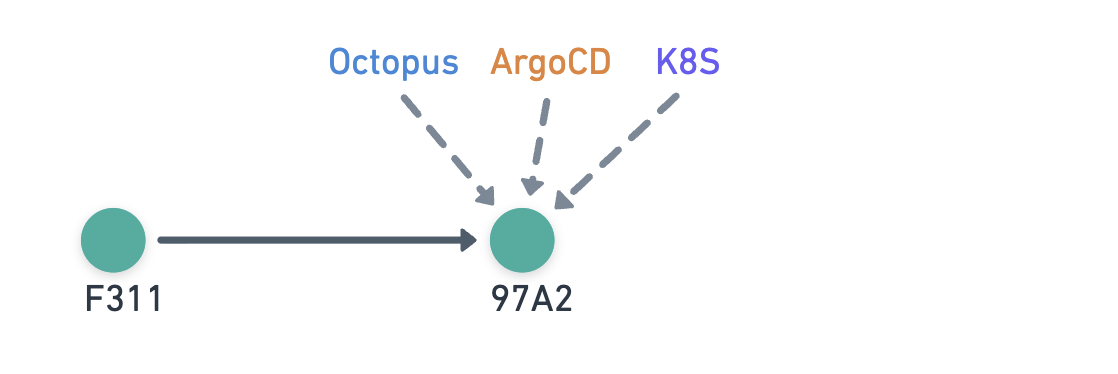
- Octopus commits
97A2 - Argo CD refreshes to
97A2and syncs the changes to the cluster
Sync status:
- Argo CD: In sync
- Octopus: In sync
This is the simplest scenario where all parties are looking at the same commit, so everyone is In sync.
Scenario 2: Out of sync
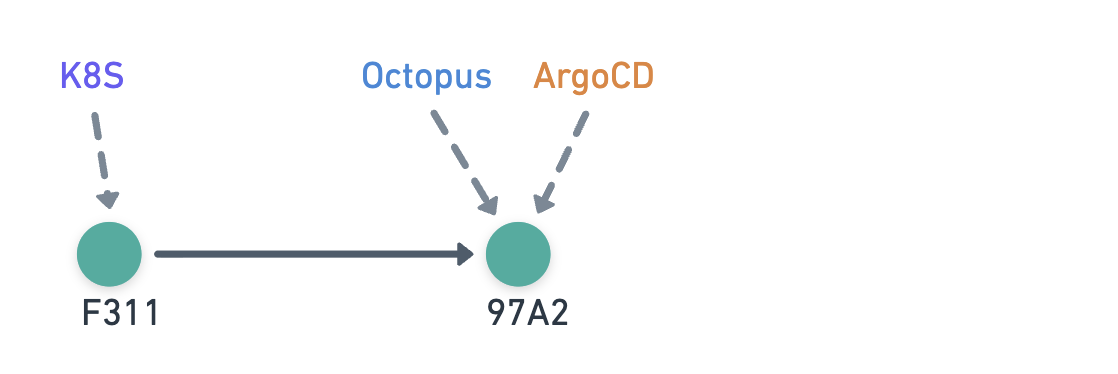
- Octopus commits
97A2 - Argo CD refreshes to
97A2but has yet to sync the changes to the cluster
Sync status:
- Argo CD: Out of sync
- Octopus: Out of sync
Even though Octopus and Argo CD are looking at the same commit, the changes have not yet been applied to the cluster, so Octopus still shows Out of sync.
Scenario 3: Octopus is ahead of Argo CD
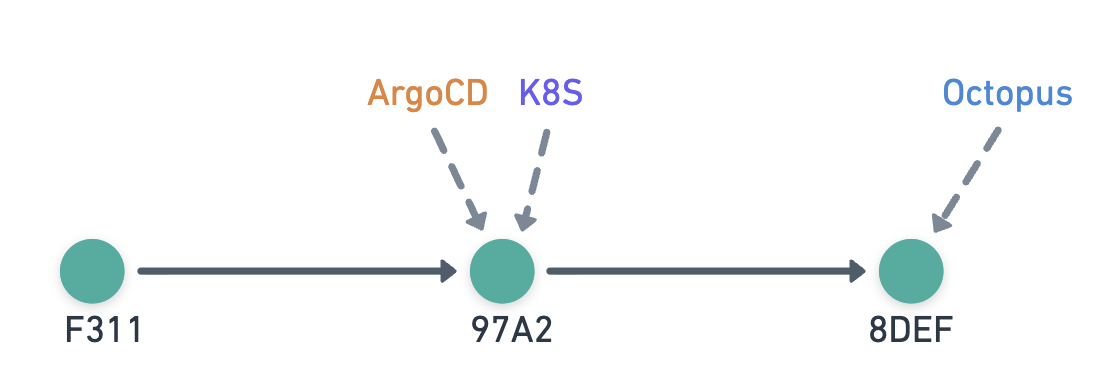
- Octopus commits
8DEF - Argo CD has yet to refresh, so it still considers
97A2to be the latest
Sync status:
- Argo CD: In sync
- Octopus: Git drift
In this scenario, Octopus has made a change that Argo CD doesn’t see yet. This state is called Git drift — even though everything looks up to date from Argo CD’s perspective, the changes made by Octopus aren’t in the cluster.
Scenario 4: External change overwrites Octopus-generated changes
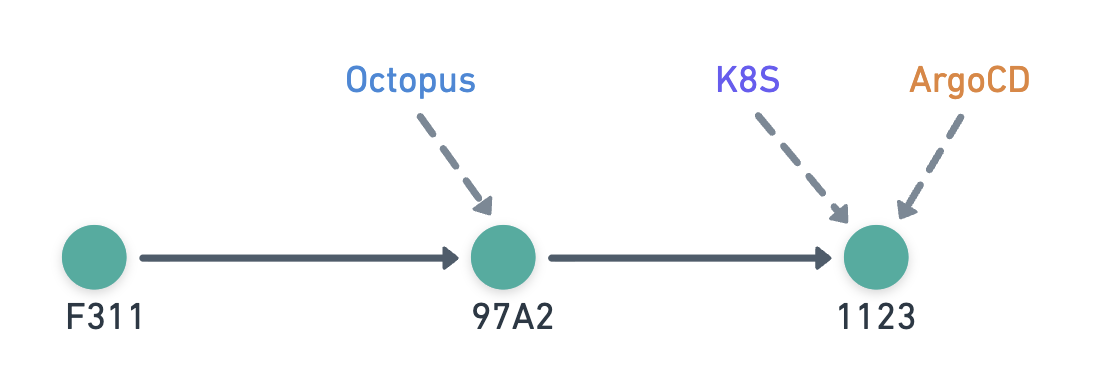
- Octopus commits
97A2 - Another process commits
1123with contents overwriting Octopus-generated changes - Argo CD refreshes to
1123and syncs the changes to the cluster
Sync status:
- Argo CD: In sync
- Octopus: Git drift
This also results in Git drift because a later commit overwrites Octopus’s changes — for example, a user updating image tags that Octopus previously set.
Scenario 5: External change is unrelated to Octopus-generated changes
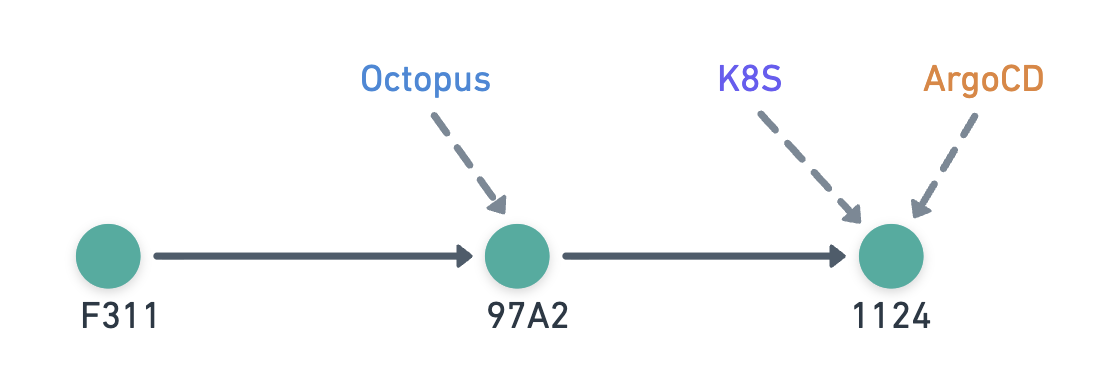
- Octopus commits
97A2 - Another process commits
1124with contents unrelated to Octopus-generated changes - Argo CD refreshes to
1124and syncs the changes to the cluster
Sync status:
- Argo CD: In sync
- Octopus: In sync
Here the later commit only contains unrelated changes — for example, a user updating the replica count after Octopus updated the image tags. Since Octopus-generated changes are still in the cluster, it displays In sync.
How does Octopus know what changes are intended?
Since Octopus pushed the changes to the Git repository, it can keep track of the intended changes. The two Argo CD steps record this information differently.
Update Argo CD Application Image Tags
This step updates the image tags in the manifests. To track changes, Octopus records JSON patches for the files it updates.
When detecting whether these changes have been overwritten:
- Octopus checks out the Git repository files for the commit that Argo CD is looking at
- Octopus re-applies the JSON patches to the files it previously updated
- If the files have any changes, then Octopus’s changes have been overwritten
JSON patches have limitations — if the manifest has been significantly restructured, you might see an unexpected Git drift status. Simply redeploy to clear this false positive.
Update Argo CD Application Manifests
This step generates the manifests that go into the application’s repository. To track changes, Octopus records the file hashes it generates.
When detecting whether these changes have been overwritten:
- Octopus checks out the Git repository files for the commit that Argo CD is looking at
- Octopus checks if the file contents have changed by comparing the hashes of the files it generated
- If the files have any changes, then Octopus’s changes have been overwritten
Does Octopus inspect the Git tree?
Octopus does not determine sync status by walking the Git commit graph. It checks file contents directly because a later commit can overwrite the intended changes.
The only exception is a small optimization: file comparisons are skipped if the commit SHA that Argo CD is looking at matches the commit Octopus made.
Help us continuously improve
Please let us know if you have any feedback about this page.
Page updated on Wednesday, June 3, 2026